Fixing SitecoreAI 524 Timeouts During CLI Serialization
Sometimes a simple content migration turns into a complex troubleshooting adventure. Recently, our team hit a significant issue while trying to pull content from our SitecoreAI environment: a large data import earlier had slowed the environment to a crawl, leading to persistent timeout errors for everyone on the team. This post details how we diagnosed the problem and ultimately applied a fix, because the answer turned out to have three separate layers.
If you landed here from a search with the same 524 error, the short version:
- Upgrade the Sitecore CLI to
6.0.23or later - the fix flag does not exist before that version. - Enable
progressiveMetadataPullin theserializationsection ofsitecore.json, and update theSitecore.DevExplugin versions there to match the new CLI. - If pulls still time out after that, do a full restart of the environment from the Deploy App.
The rest of the post is how we found those three steps, plus what Sitecore Support's telemetry showed the root cause to be.
The Incident: Environment at a Crawl
The issue began when a large data import brought our SitecoreAI environment to its knees. Users were suddenly greeted with intermittent 503 Service Unavailable screens, and we saw random errors pop up across the application.
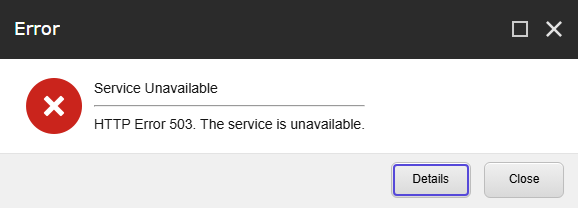
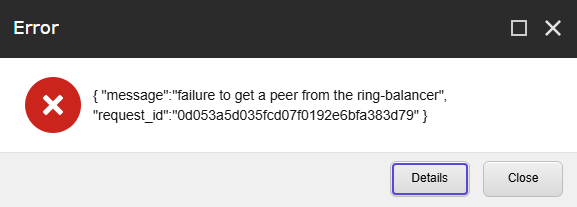
When running serialization commands from our local machines, we started hitting an "Unexpected HttpResponseMessage with code 524" - 524 is a Cloudflare timeout status, and SitecoreAI environments sit behind Cloudflare. In addition to this timeout, we occasionally saw a rather unhelpful ring balancer error indicating a failure to get a peer.
A teammate stepped in and deleted all the newly imported products, which immediately restored the environment's general stability. However, when we attempted a full pull from Sitecore down to our local environments, it still consistently failed with a 524 response code.
Initial Troubleshooting Efforts
We needed to figure out why the pull operation was still failing despite the environment seeming stable otherwise.
First, the team tried pulling specific, smaller modules, which worked perfectly fine. The issue was strictly isolated to a full pull operation using the Sitecore CLI.
Since we were getting 524 timeouts, I suggested adding the progressiveMetadataPull serialization property to our sitecore.json file. This property is designed to help with large payloads, particularly in environments sitting behind Cloudflare, which imposes strict timeout limits.
However, a teammate had already tried adding that property without success - and he pointed out the important detail: the progressiveMetadataPull feature was introduced in Sitecore CLI version 6.0.23, and our project was still running on version 5.2.113.
Upgrading the Sitecore CLI
Realizing our CLI version didn't support the configuration we were trying to use, we decided to upgrade.
Here is what our .config/dotnet-tools.json looked like before the upgrade:
{
  "version": 1,
  "isRoot": true,
  "tools": {
    "sitecore.cli": {
      "version": "5.2.113",
      "commands": [
        "sitecore"
      ]
    },
    "leprechaun.cli": {
      "version": "2.2.4",
      "commands": [
        "leprechaun"
      ]
    }
  }
}
We updated the CLI tools using the following terminal commands:
dotnet tool update sitecore.cli --version 6.0.23
dotnet sitecore plugin init --overwrite
This updated the .config/dotnet-tools.json file to the newer version:
{
  "version": 1,
  "isRoot": true,
  "tools": {
    "sitecore.cli": {
      "version": "6.0.23",
      "commands": [
        "sitecore"
      ],
      "rollForward": false
    },
    "leprechaun.cli": {
      "version": "2.2.4",
      "commands": [
        "leprechaun"
      ],
      "rollForward": false
    }
  }
}
Next, we needed to make sure our schemas supported the new property. We added the definition right below excludedFields in .sitecore/schemas/RootConfigurationFile.schema.json:
"progressiveMetadataPull": {
  "type": "boolean",
  "description": "Determines serialization metadata pull mode.",
  "default": false
}
Finally, we updated sitecore.json. Importantly, we had to update the Sitecore.DevEx plugin versions to match the 6.0.23 release and add the progressiveMetadataPull flag to the serialization node. Two things you will notice in the diff below: the XMCloud plugin is versioned separately and stays at 1.1.99, and plugin init --overwrite adds the new Database plugin on its own.
Before the update:
{
  "$schema": "./.sitecore/schemas/RootConfigurationFile.schema.json",
  "modules": [
    "authoring/*.module.json",
    "//npm:@constellation4sitecore/constellation-sxa-nextjs",
    "//npm:@constellation4sitecore/labels"
  ],
  "plugins": [
    "Sitecore.DevEx.Extensibility.Serialization@5.2.113",
    "Sitecore.DevEx.Extensibility.Publishing@5.2.113",
    "Sitecore.DevEx.Extensibility.Indexing@5.2.113",
    "Sitecore.DevEx.Extensibility.ResourcePackage@5.2.113",
    "Sitecore.DevEx.Extensibility.XMCloud@1.1.99"
  ],
  "serialization": {
    "defaultMaxRelativeItemPathLength": 100,
    "defaultModuleRelativeSerializationPath": "items",
    "removeOrphansForRoles": true,
    "removeOrphansForUsers": true,
    "continueOnItemFailure": false,
    "excludedFields": []
  },
  "settings": {
    "telemetryEnabled": false,
    "cacheAuthenticationToken": true,
    "versionComparisonEnabled": true,
    "apiClientTimeoutInMinutes": 5
  }
}
After the update:
{
  "$schema": "./.sitecore/schemas/RootConfigurationFile.schema.json",
  "modules": [
    "authoring/*.module.json",
    "//npm:@constellation4sitecore/constellation-sxa-nextjs",
    "//npm:@constellation4sitecore/labels"
  ],
  "plugins": [
    "Sitecore.DevEx.Extensibility.XMCloud@1.1.99",
    "Sitecore.DevEx.Extensibility.Serialization@6.0.23",
    "Sitecore.DevEx.Extensibility.Publishing@6.0.23",
    "Sitecore.DevEx.Extensibility.Indexing@6.0.23",
    "Sitecore.DevEx.Extensibility.ResourcePackage@6.0.23",
    "Sitecore.DevEx.Extensibility.Database@6.0.23"
  ],
  "serialization": {
    "defaultMaxRelativeItemPathLength": 100,
    "defaultModuleRelativeSerializationPath": "items",
    "removeOrphansForRoles": true,
    "removeOrphansForUsers": true,
    "continueOnItemFailure": false,
    "excludedFields": [],
    "progressiveMetadataPull": true
  },
  "settings": {
    "telemetryEnabled": false,
    "cacheAuthenticationToken": true,
    "versionComparisonEnabled": true,
    "apiClientTimeoutInMinutes": 5
  }
}
The Final Piece of the Puzzle
With the CLI upgraded and configured, we confidently tried pulling the content again. To our surprise, it still timed out!
The large volume of data had already been cleaned up, but the pulls were stubbornly failing. At this point, I suggested we do a full restart of the system directly from the SitecoreAI Deploy App to clear out any lingering bad states.
After the restart completed, we triggered the content pull from the CLI once more. Voila! It worked perfectly.
The Root Cause, per Sitecore Support
We had an open ticket with Sitecore Support, and their analysis of the telemetry data confirmed our suspicions about the root cause. They observed massive memory usage spikes starting right around the time our issues began, correlating directly with the timing of the large data import.
The logs showed OutOfMemoryException entries shortly before the environment would restart itself. Support noted that after each automatic restart, memory consumption would drop, only to skyrocket back to maximum capacity almost instantly.
Their conclusion was that the data package introduced an incredibly large and complex item structure. When those items were accessed, it caused severe memory consumption. A contributing factor, they suggested, could have been a large number of sibling items without a proper bucketed structure. This aligns with Sitecore's official guidance: when a content tree becomes overly large without bucketing, locating items becomes difficult and performance degrades rapidly.
Rolling it out to the Team
With the fix confirmed, we committed the updated configuration files to our repository and shared a quick set of instructions so the rest of the team could get up and running smoothly.
The first teammate to verify the rollout confirmed the simple dotnet tool restore command worked flawlessly.
If you are facing similar issues on your team, pull the latest changes from your branch and run the following at the root of your project:
dotnet tool restoreThen, try to run a pull. If it completes successfully, you are good to go.
If the pull still fails, you may need to force the update locally by running:
dotnet tool update sitecore.cli --version 6.0.23
dotnet sitecore plugin init --overwrite
This experience was a great reminder of how teamwork can turn a frustrating system crawl into a successful resolution. By combining our knowledge of CLI tools, configuration management, and system infrastructure, we were able to get our environments stable and pulling data correctly again.